Overview
- Full-screen 16:9 dark-theme signage board at
/tv/ - Designed for in-venue TV screens and blocks mobile viewports with a friendly message
- Pulls live data from
/api/eventsevery 2 minutes - Uses the API response’s
lastUpdatedtimestamp as the shared clock anchor for slideshow rotation and featured-event conflict rotation - Visible header clock is still device-local time
- Caches the last successful
/api/eventspayload inlocalStorageso reloads can repaint immediately from prior data - Polls
/api/tv-buildevery minute and reloads only when the deployed TV build changes TV_BUILD_IDis injected dynamically by the worker aswindow.__TV_BUILD_ID__; if the TV loads a cached HTML page, the build ID self-corrects from the first poll result- Hard-refresh fallback every hour via
<meta http-equiv="refresh"> /tv/can show a device-side debug overlay whenTV_DEBUG_MODE = "1"is injected by the worker
Sources: public/tv/index.html, public/tv/script.js, public/tv/styles.css
Live Screenshots
The TV is easier to understand from screenshots than from the DOM alone. These captures were taken from the live production page at pub.ihnyc-rc.org/tv on April 4, 2026.
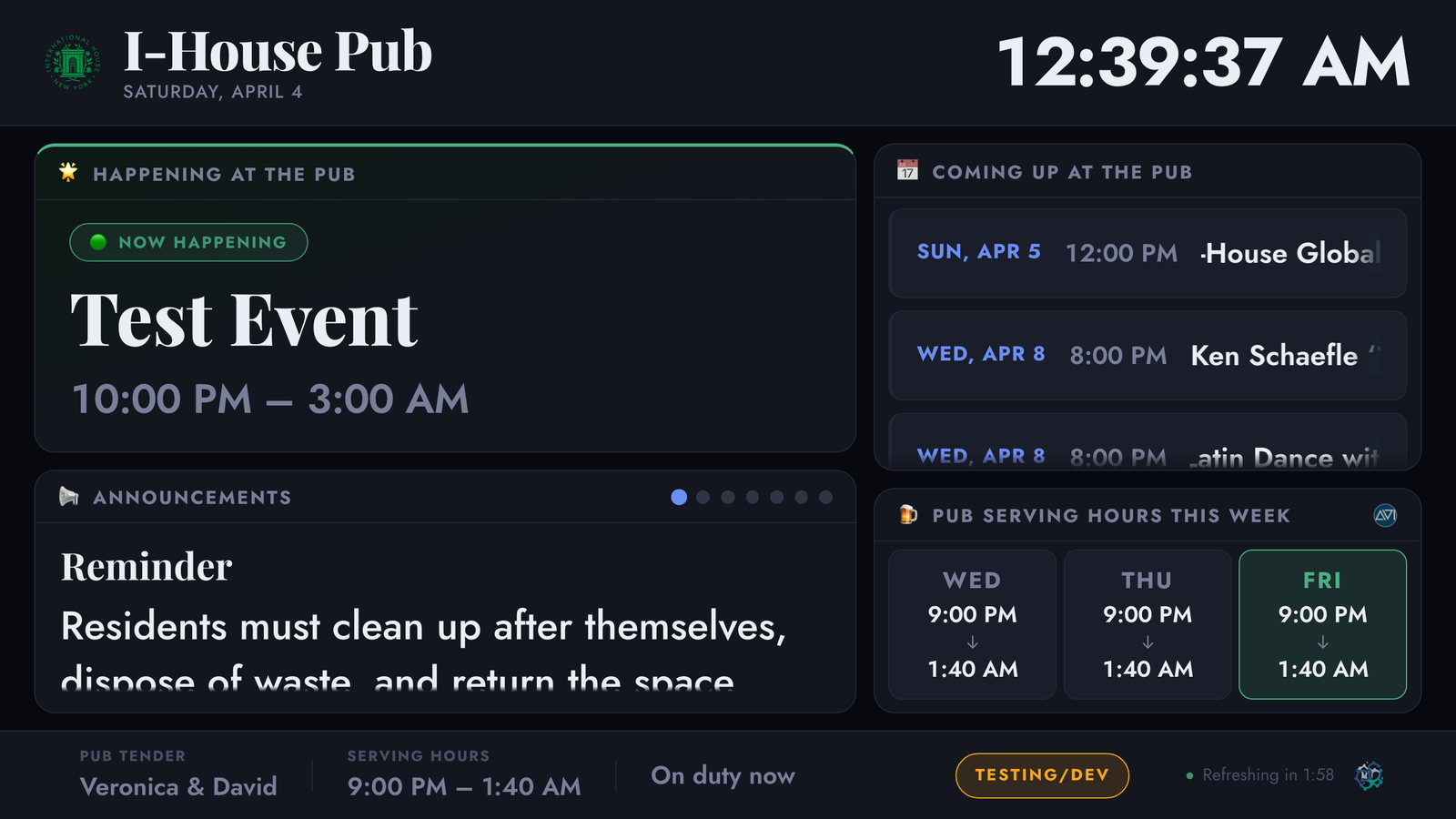
- Left column:
Happening at the Pubfor same-day featured activity and the mixed announcement / tender slideshow beneath it - Right column:
Coming Up at the Pubfor tomorrow-through-next-7-days events andPub Serving Hours This Weekfor the current weekly service grid - Footer: current tender assignment, serving window, shift note, refresh countdown, and environment flag
- In this live frame,
Happening at the Pubis populated by an overnight event that began the previous evening and is still active after midnight
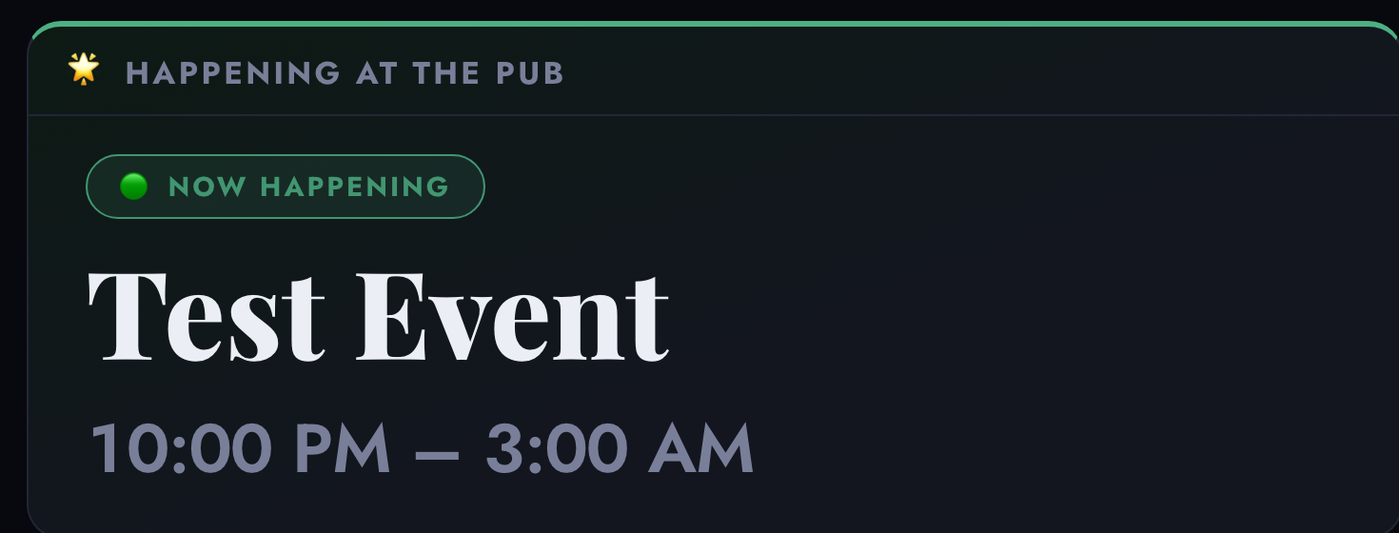
- This panel is driven from
todayEventsand now correctly includes overnight events that overlap the current Eastern calendar day - The green
Now Happeningbadge is the highest-priority featured state and is what pub staff and guests should notice first
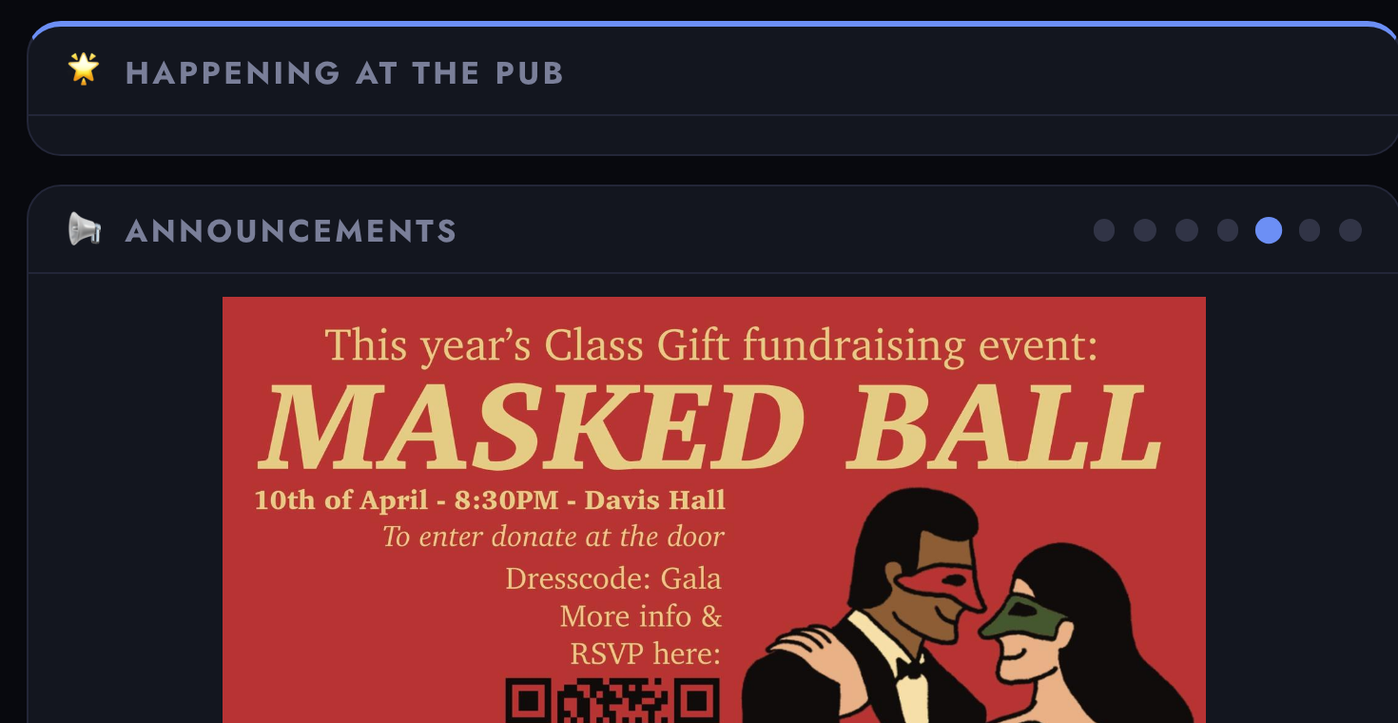
- Announcement slides can be text, image, or mixed image+text
- The slideshow dots indicate the current slide and give manual navigation targets
- When a full image announcement is active, the slide can use most of the lower-left panel
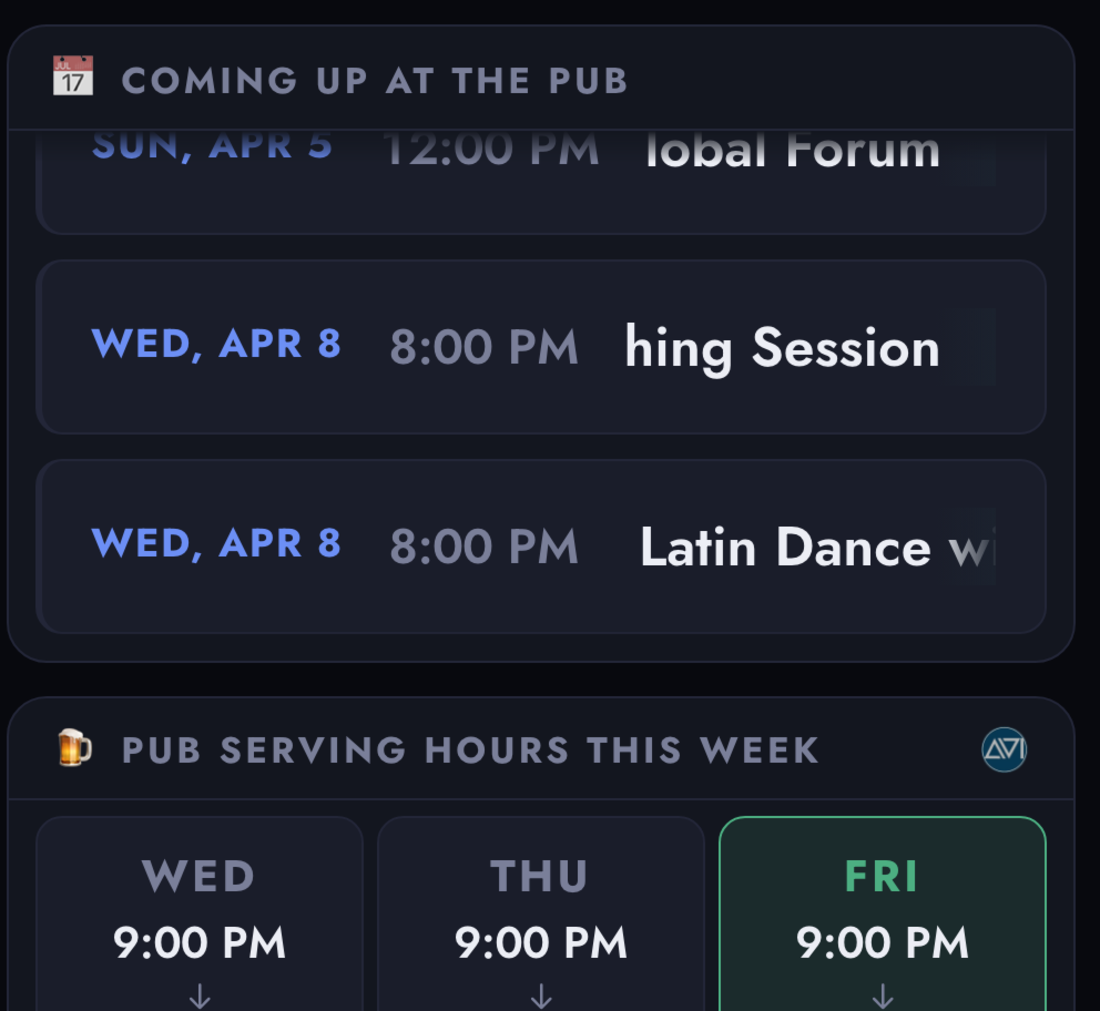
Coming Up at the Pubis optimized for quick scanning of the next several pub eventsPub Serving Hours This Weekhighlights today’s service state while still showing the rest of the week- This right-side column is the highest-density “what is going on here?” area for people glancing at the TV
Layout
+-----------------------------------------------------+
| Header: logo, current date, live clock              |
+------------------------------+----------------------+
| Left column                  | Right column         |
| - Happening at the Pub       | - Coming Up at the   |
| - Announcements / tender     |   Pub                |
|   slideshow                  | - Pub Hours This     |
|                              |   Week               |
+-----------------------------------------------------+
| Footer: tender, hours, note, refresh, test flag     |
+-----------------------------------------------------+
Sources: public/tv/index.html, public/tv/styles.css (.tv-main, .tv-left, .tv-aside)
Event Inclusion Pipeline
The TV page does not query Notion directly. It renders whatever the worker returns from GET /api/events.
Both event arrays use the same base gate:
Include on Pub TVmust be checked (location is no longer filtered — any location or none is accepted)- Events are sorted by actual start timestamp before the API response is returned
todayEvents
- The worker computes
todayISOinAmerica/New_York - The event day starts at 12:00 AM Eastern
- The worker queries a broad Notion window from
todayISOthrough< todayISO + 2 days - It then narrows that result set to rows whose
Event Startfalls ontodayISOin Eastern time
weekEvents
- Uses the same pub-location and TV-include gates
- Pulls rows with
Event Start >= tomorrowISOand< todayISO + 8 days - That means calendar tomorrow through the next 7 days
Sources: worker.js (fetchFromNotion, eventOverlapsLocalDate, transformPage, transformWeekPage)
Event Status Logic
Each event is evaluated client-side using ISO timestamps from the API and the TV’s server-aligned clock.
| Status | Condition | Badge |
|---|---|---|
Now | startMs <= now < endMs | Now Happening |
Next | Starts within 90 minutes | Coming Up Next |
Later | Starts more than 90 minutes from now | Coming Soon |
Done | End time has passed | Hidden |
- The Featured Event panel shows the highest-priority non-
Doneevent (Now>Next>Later) - When multiple events share the same timeslot and status, the panel rotates among them every 15 seconds using the shared server-aligned clock
- The Coming Up list filters out any
Donerows before rendering - If an event has no usable end timestamp, the client falls back to
start + 1 hour
Sources: public/tv/script.js (deriveStatusFromEvent, selectFeaturedEvent, renderWeekEvents)
Happening at the Pub
This panel renders from todayEvents only.
- The client re-derives every event’s live status from
startIsoandendIso - It picks a single featured row using priority order
Now→Next→Later - It renders the featured title, RC badge, time range, and location (if set)
- It then lists the remaining non-
Donesame-day events underAlso today, each with title, time, and location
If there is no non-Done same-day event, the panel stays visible and shows the empty-state message.
Sources: public/tv/script.js (withLiveStatuses, selectFeaturedEvent, renderFeaturedEvent)
RC Classification Badges
Events can carry one of two RC classification tags, shown as a badge before the event title.
| Tag | Badge style | Meaning |
|---|---|---|
rc-direct | Solid green | Organized by an RC member |
rc-affiliate | Outlined accent | Resident-led, supported by the RC |
- Badge displays the RC logo (
RC-transparent-background-logo.png) - Tag is extracted from the event row’s
Source Email Subjectby matchingRC-DirectorRC-Affiliate
Sources: public/tv/script.js (rcBadgeHtml), worker.js (extractRcTag)
Announcements and Meet your Tender Slideshow
The bottom-left panel is a slideshow that rotates through two types of slides:
- Announcement slides
- Tender profile slides
Slides auto-advance according to each slide’s configured duration, defaulting to 10 seconds. Navigation dots are shown inline in the panel heading bar, right-aligned after the slide heading text (e.g. “Announcements ●●○”). They are hidden when only one slide is present.
The slide position is no longer session-relative. Each TV computes the active slide from:
- the shared
slidespayload - each slide’s duration
- the API response’s
lastUpdatedtimestamp
That keeps multiple TV sessions aligned even if browsers were opened at different times, as long as they are on the same payload.
Announcement slides
- Can be text-only, image-only, or mixed image+text cards
- Show a title (
Name) and body text (Content, falling back toName) - Can render an image from the announcement page’s
Picture,Image, orPNGfile property - Use
Durationwhen present to override the default 10-second slide duration - Use the announcement
priorityfield as a styling hint - Image URLs are rewritten to same-origin
/api/image/announcement/:pageIdroutes before the frontend sees them - Those image routes can mirror Notion-hosted files into R2, so always-on TV sessions are less dependent on temporary Notion file URLs remaining valid
- Pure image slides collapse the featured-event panel into a compact strip so the announcement image can use more vertical space
- Fall back to a single empty-state message if the combined slides array is empty
Tender profile slides
- Heading reads “Meet your Tender”
- Show the tender’s first name only
- Show the tender’s
Picturethrough a same-origin/api/image/tender/:pageIdroute - Show a QR image only when the
QRfile property resolves successfully, via/api/image/tender-qr/:pageId - Do not currently show the tender bio, even if
Bioexists on the Notion page - Do not generate a QR in the browser. The TV only renders the pre-generated Notion
QRimage file - Are only generated when
Meet your Tenderis checked on the tender page
Tender slide layout
The tender card (
.slide-tender-layout) usesposition: absolutewith explicitinsetvalues rather than flex sizing. Flex-based percentage-height resolution through theposition: absoluteslideshow chain was unreliable on certain TV rendering environments. The inset values map directly to.tv-slide’s edges and are deterministic on all screens.
QR code destination
The QR code displayed in the tender slide encodes the Short.io short URL (e.g.
go.affectivetech.com/pub-pt3). That short URL’s target is the canonical profile URL/tenders/?tender=<id>. The older/tender/:idroute still exists only as a compatibility redirect into the query-based directory URL.
Sources: public/tv/script.js (renderSlideshow, renderSlideMarkup), worker.js (buildSlides, fetchTenderInfoFromAssignmentPage)
Coming Up Panel
- Renders from
weekEvents, which the worker defines as calendar tomorrow through the next 7 days - Same-day events are intentionally excluded
- Events whose computed status is
Doneare removed before rendering - Long event titles animate with a horizontal marquee scroll
- The panel is hidden entirely if no upcoming events remain
Sources: public/tv/script.js (renderWeekEvents, startWeekTitleScroll)
Pub Hours Grid
- Seven-column grid showing Sunday through Saturday pub hours for the current week
- Today’s column has three visual states:
- amber before today’s first shift segment starts, or between multiple segments
- green while a shift segment is active
- dimmed after the last segment has ended
- Overnight segments like
9:00 PM - 1:40 AMare treated as ending on the next day when determining those states - Shift window math is evaluated explicitly in
America/New_York, not the browser’s local timezone
Sources: public/tv/script.js (renderPubHoursWeek, getShiftStateForDate, getEffectivePubHoursDate)
Pub Tender Footer
Persistent footer bar showing the on-duty tender and live shift state.
| Field | Content |
|---|---|
| Pub Tender | First name(s) of on-duty tender(s) |
| Serving Hours | Operational timeframe |
| Shift State | Live note with color and animation |
Footer vs profile slide
The footer always shows the tender’s first name, regardless of whether
Meet your Tenderis checked. The checkbox only gates the profile slide in the slideshow panel.
Shift state transitions
| State | Note text | Visual |
|---|---|---|
upcoming | Upcoming shift | Normal |
setup | Setting up | Amber |
active | On duty now | Normal |
last-call | Last call | Red, pulsing |
closed | Cleaning / closed | Dimmed |
inactive | No active shift right now | Normal |
Sources: public/tv/script.js (renderPubTender), worker.js (deriveShiftNote)
Refresh Strategy
| Mechanism | Interval | Purpose |
|---|---|---|
| Featured event re-evaluation | 15 seconds, client-side | Keeps badges and same-timeslot rotation accurate between API calls |
| Soft data refresh | 2 minutes via /api/events | Pulls fresh event, announcement, and tender-footer data |
| Build fingerprint poll | 1 minute via /api/tv-build | Reloads only when deployed TV assets actually changed |
| Hard meta refresh fallback | 1 hour | Safety net if JavaScript hangs completely |
| Countdown display | Live | Shows Refreshing in M:SS in the footer |
| Slideshow rotation | Duration-driven, default 10 seconds | Advances slides using the shared server-aligned cycle |
Sources: public/tv/script.js (init, startRefreshCountdown), public/tv/index.html (<meta http-equiv="refresh">)
Debug Mode
Set TV_DEBUG_MODE = "1" and open /tv/ to show a device-side overlay with:
/api/eventsfetch status- server timestamp used for sync
- active slide index and type
- image load vs error status
- exact current image URL
- viewport size, DPR, and user agent
- unhandled JS/runtime errors
This mode exists specifically to debug embedded TV browsers that behave differently from desktop browsers.
Sources: public/tv/script.js (TV_DEBUG_MODE, installDebugHooks, startBuildPolling), worker.js (buildTvAssetResponse, handleTvBuildApi), public/tv/styles.css (.tv-debug-overlay)
iPad Night Board (/ipad/)
A separate landscape-only board at /ipad/ designed to sit on a bar-top iPad during pub events.
What it shows
- Tonight’s Events — all
todayEventsreturned by the API, each row showing: status pill (Now/Next/Later/Done), event title, and time + location inline (7:00 PM – 9:00 PM · 📍 Pub) - On Shift Tonight — photo(s) and full name(s) of active pub tenders from
pubTender.activeTenders
What it does not show
- No hero/featured event panel
- No announcement slideshow
- No “Coming Up” week list
- No board-status meta (refresh cadence, source, last sync)
- No tender shift notes, hours, or detail cards
Layout
+---------------------------------------------+
| Logo  Tonight at the Pub  [date]     [clock] |
+----------------------------+----------------+
| Tonight's Events           | On Shift       |
|                            | Tonight        |
| [Now]  Trivia Night        |                |
|        8:30 PM · 📍 Pub   |  [photo]       |
|                            |  First Last    |
| [Next] Karaoke             |                |
|        10:00 PM            |                |
+----------------------------+----------------+
Event row ordering and states
- Active events (
Now,Next,Later) are always shown first Doneevents are sorted to the bottom, faded to 45% opacity- If all events are done, the list collapses to a single “All wrapped up for tonight” message — no need to show a wall of faded rows
Event row accent
- The active
Nowrow gets a green left-border accent, a subtle green tint, and a slow breathing glow animation so bar staff can spot the current event without reading the pill - All rows carry a 3px left border; only
Nowhas a colored one
Refresh
- Data: every 60 seconds via
/api/events?window=1 - Clock: every 10 seconds client-side
- Status re-evaluation: every 15 seconds client-side
- Hard page reload: every 5 minutes via
<meta http-equiv="refresh"> - Portrait orientation on a touch device shows a rotate prompt and hides the board
Rotation blocker
If the iPad is held in portrait, a full-screen overlay asks the user to rotate. The board content is hidden until landscape orientation is restored.
Sources: public/ipad/index.html, public/ipad/script.js, public/ipad/styles.css