The Pub admin UI lives at https://pub.ihnyc-rc.org/admin/. It covers the TV wall, weekly scheduling, content, audio, lighting, DJ Mode, and system health. Pages are server-rendered from worker.js in one responsive shell.
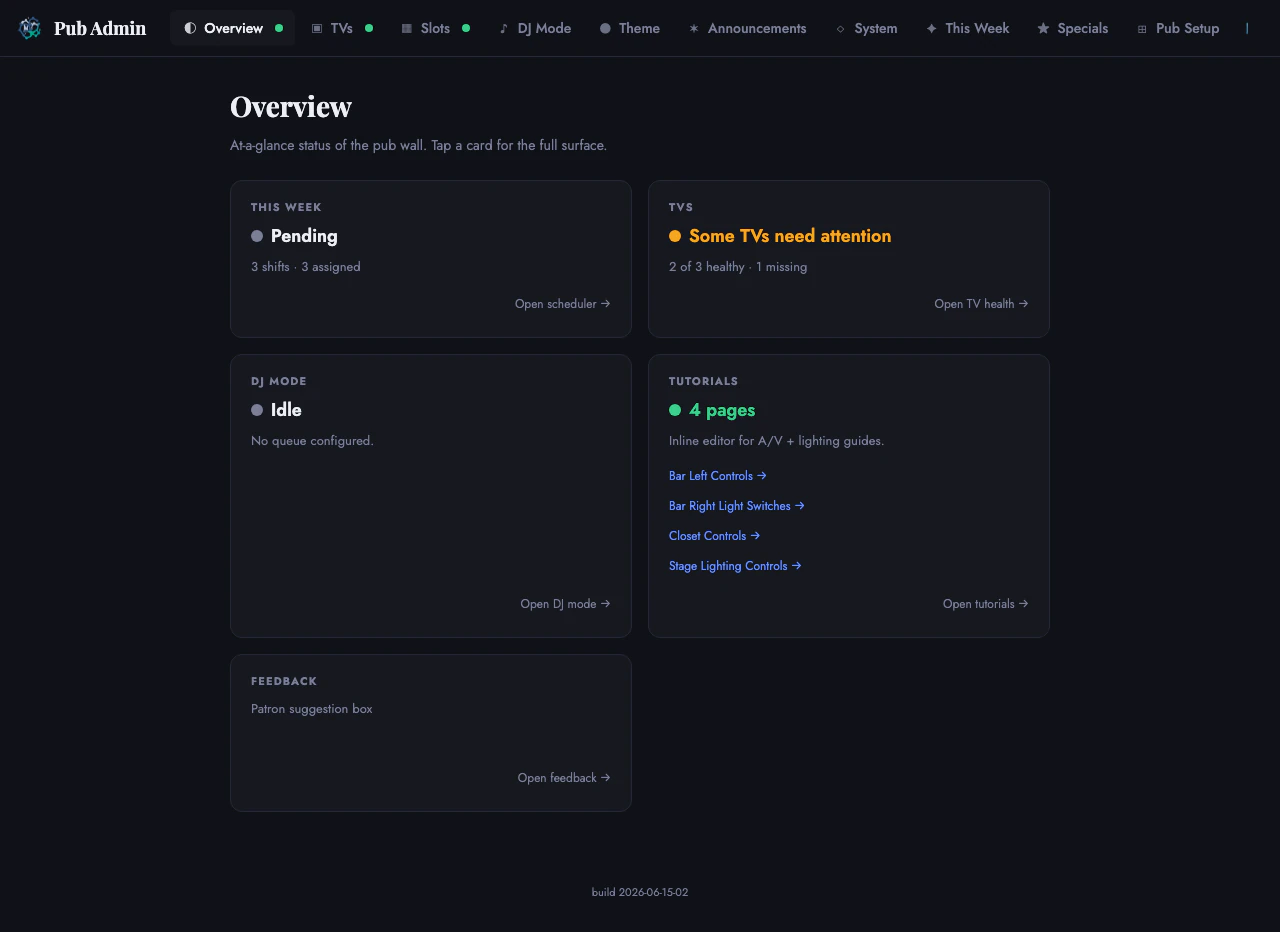 Admin hub status overview · June 2026
Pages
| Tab | Path | What it does |
|---|---|---|
| Overview | /admin | At-a-glance status cards for This Week, TVs, DJ Mode, Tutorials, and Feedback with live health indicators (the TVs card names the specific slot needing attention) |
| TVs | /admin/tv-health | Live heartbeat dashboard for every connected TV. Shows build version, memory, fetch status, JS errors, and uptime per screen |
| Slots | /admin/slots | Manage TV slot identities. Add, rename, delete, and pair physical TVs to named slots; pause health warning counts and offline email for intentionally parked devices without hiding their actual state |
| DJ Mode | /admin/dj-mode | Programmed background video queue for the projector. Patron photo uploads, flash queue, per-surface lyrics toggles (projector + right bar TV), and queue management |
| Theme | /admin/theme | Brand color and scheduled palettes. Pick or create accent color presets, schedule them by date range, toggle between preset-driven and album-art-driven right TV accent |
| Announcements | /admin/announcements | Create and manage announcements shown on the right bar TV. Set title, content, image, priority, duration, display toggle, and an optional expiry (datetime — once past, the announcement auto-hides from the TV + public page; the admin list still shows it, dimmed with an “Expired” pill). Row thumbnails open a click-to-enlarge lightbox; an image-less notice shows a no-image icon rather than a placeholder label |
| System | /admin/api-health | Health of external API dependencies (Notion, LRCLib, Short.io, Deezer, Formbricks, Workers AI, ESPN, TMDB) plus a live in-venue device panel (Song-ID Pi, AVPro matrix, projector, TSC-70 touchscreen, Q-SYS sound-stage mode, DMX lighting rig, content-detect verdict). Auto-refreshes every 30 seconds |
| Access | /admin/access | Add delegated operators, grant permission bundles or individual permissions, sync their dedicated Cloudflare policy, and revoke access |
| Audit Log | /admin/audit | Review admin changes, including access, audio, lighting, and scheduler actions |
| Lighting | /admin/lighting | Operator console for the DMX par-can rig. Scenes, programs, music modes, autopilot, blackout, master intensity, and crossfade, plus a live header read from the Pi heartbeat (current look, song, serial health). Writes a desired intent the Pi reconciles within ~5s |
| Audio | /admin/audio | Discover writable Q-SYS controls, curate operator groups, lock controls, adjust allowlisted faders, and capture or restore snapshots |
| Now Showing | /admin/now-showing | Operator “what’s on the big screen” picker. Override the auto sports/movie card — name a movie (logged to /screen), force a specific live game, show a generic “on the big screen”, hide the card, or hand it back to automatic |
| QR Scans | /admin/tender-scans | Per-tender QR-scan dashboard from Cloudflare Analytics Engine (selectable window). Degrades to “stats unavailable” if AE is unconfigured |
| Feedback | /admin/feedback | Patron feedback / suggestion-box triage (new / read / archived). Reads the pub_feedback table; gated by FEEDBACK_ENABLED |
| This Week | /admin/pub-schedule | The weekly scheduling wizard. See pub-scheduler-n8n |
| Specials | /admin/pub-specials | Manage drink and food specials shown on the right bar TV |
| Pub Setup | /admin/pub-setup | Card grid linking to Tenders, Shifts, Email Templates, Supervisors, Email Log, Stats, and Raw Database |
| Tutorials | /tutorials-admin | Permission-gated launcher for the four tutorial pages and their inline editor |
Identity and permissions
Every admin request uses one of two paths:
- Operator session: the Worker verifies the Cloudflare Access JWT, looks up the email in
pub_admin_roles, and checks the required permission. - Root token:
PUB_ADMIN_TOKENgrants*for automation and recovery throughX-Admin-Tokenor a bearer header.
The browser shell does not receive the root token. A valid Access session with no Pub role returns 403.
Permission scopes are:
| Scope | Work |
|---|---|
scheduler.* | Shifts, assignments, approvals, email, tenders, supervisors, and settings |
tv.* | TV health, slots, control, Q-SYS, DMX, SmartThings, and streaming |
content.* | Specials, announcements, screenings, Now Showing, feedback, and QR stats |
dj.* | Moderation, queue, uploads, lyrics, quiet hours, Spotify Jam, and setlist |
tutorials.* | Tutorial viewing and editing |
The Access page offers matching operator bundles. New admin routes default to full-administrator access until a narrower permission is assigned.
Pub permissions are independent from RC Console.
Shared shell
Every admin page uses renderAdminShell() which provides:
- Sticky header with the Pub Admin brand, navigation links, and state badges
- Mobile tab bar (below 640px) with the same navigation in a scrollable bottom strip
- State badge script that polls
/api/admin/tv/dashboardevery 60 seconds and paints green/amber/red dots on the TVs, Slots, and Overview nav items - Dynamic favicon that changes color to match the worst TV slot state (green = healthy, amber = stale, red = missing)
- AdminKit controls — shared dropdown, checkbox, toggle, modal, toast, and date/time picker components used across all pages
Theme system
 Theme editor and live preview
The theme page controls the accent color across all patron-facing surfaces (TVs, events page, tenders page). Features:
- Quick activate dropdown to switch between saved presets instantly (TVs update within 6 seconds)
- Right TV accent mode — choose between preset-driven (same color everywhere) or auto-from-album-art (right TV picks up the dominant color of whatever song is playing)
- Preset editor — create named presets with accent hex, text-on-accent color, and advanced palette overrides
- Live preview — shows how the preset looks on TV surfaces before activating
- Schedule — time-based preset activation (e.g., “Pride” preset active June 1-30)
- Draft/Published status — draft presets are invisible to quick-activate until published
DJ Mode
The DJ Mode page manages the projector’s background video queue:
- Currently Playing — shows what is on the projector right now
- Pending from the Crowd — patron-uploaded photos/videos from
/upawaiting moderation - Flash Queue — approved items waiting their turn in the rotation
- Lyrics Overlay — toggle synced song lyrics. Two independent per-surface toggles — the projector and the right bar TV — each stored separately in
DJ_MODEKV, so either surface can show lyrics on its own. Requires the Pi chromeprint engine - DJ Direct Upload — skip moderation, send a photo straight to the flash queue with configurable hold duration
- Queue — ordered list of YouTube/video URLs with per-item duration. Save and restart to apply changes
- Auto-approve patron uploads — bypass moderation so patron photos go directly to the wall
- Quiet hours — per-day schedule, lock, PIN override, and explicit re-lock
- Spotify Jam — show a Jam QR on the selected display, including an optional quiet-hours invite
Audio control
/admin/audio reads the writable Q-SYS control inventory through the Pub relay. Full administrators curate the smaller set operators may touch.
- Group related controls and order them for the room.
- Lock a control or group without deleting its configuration.
- Adjust allowlisted faders with live readback.
- Capture a named snapshot before a risky change.
- Preview and restore a snapshot through the batch relay.
The page is full-admin only. Q-SYS controls that are not discovered and allowlisted do not become writable merely because they exist on the Core.
System (API health and in-venue devices)
Labeled System in the nav (/admin/api-health).
 API health checks
Monitors the external APIs the pub depends on:
- Notion — events data source
- LRCLib — synced lyrics for the lyrics overlay
- Short.io — tender QR code short links
- Deezer — genre enrichment for Vibe Compass (replaced iTunes Search, which was rate-limited by Apple on Cloudflare’s shared IPs)
- Formbricks — availability form submissions polling
- Cloudflare Workers AI — Persona and Stories AI prose surfaces
- ESPN — keyless live-sports scoreboard for the “Now Showing” sports card and
/api/sports/live(passive; recorded from the schedule cron) - TMDB — movie metadata / posters for the screenings “Now Showing” card (active probe; idles to keyless Deezer poster fallback when
TMDB_API_KEYis unset)
Each API shows: status dot (green/amber/red), active vs passive probe mode, last-ok timestamp, and response latency. Active APIs are probed by the cron; passive APIs report health from real traffic.
In-venue devices
Below the external APIs, the page shows a live panel of the in-venue AV hardware, read from the Pi’s heartbeat and the Q-SYS / DMX state the Pi forwards over QRC. Each card hides when its source isn’t reporting:
- Song-ID Pi — deployed build + last-heartbeat age
- AVPro matrix — reachability, active input→output routing, per-input signal
- Projector — power / input / lamp-hours / errors (PJLink)
- TSC-70 touchscreen — current page, on-board temp, brightness/dim, signed-in vs locked, LAN address
- Q-SYS sound stage — current vs desired sound-stage mode (shown once the Pi reports the Core over QRC)
- Lighting rig — live look/autopilot, master brightness, now-playing song, serial/lock state, and can count, with a link to the full
/admin/lightingmonitor - Content detect — the Pi’s music-vs-video classifier verdict (kind + confidence, p(video), and screen/speech/music scores)
Tutorial editor
Operators with tutorials.edit see an “Edit this page” button on each tutorial page (/tutorials/bar-left-controls/, etc.). Clicking it enters edit mode:
- All visible text becomes editable (click to type)
- Hotspot zones can be dragged, resized, added, or deleted
- Troubleshooting steps are editable inline
- Save writes to KV (
TUTORIALS_DATAnamespace), with version history in D1 - “Restore built-in” reverts to the code-bundled content
- “History” shows past versions with one-click restore
Four tutorial pages are available: Bar Left Controls, Bar Right Light Switches, Closet Controls, and Stage Lighting Controls.
Weekly scheduler
The 4-step wizard at /admin/pub-schedule — Shifts → Form & Availability → Assignments → Send. State is driven by the run (form opened, generated, assignment count, status). Tender names are redacted in the shot below.
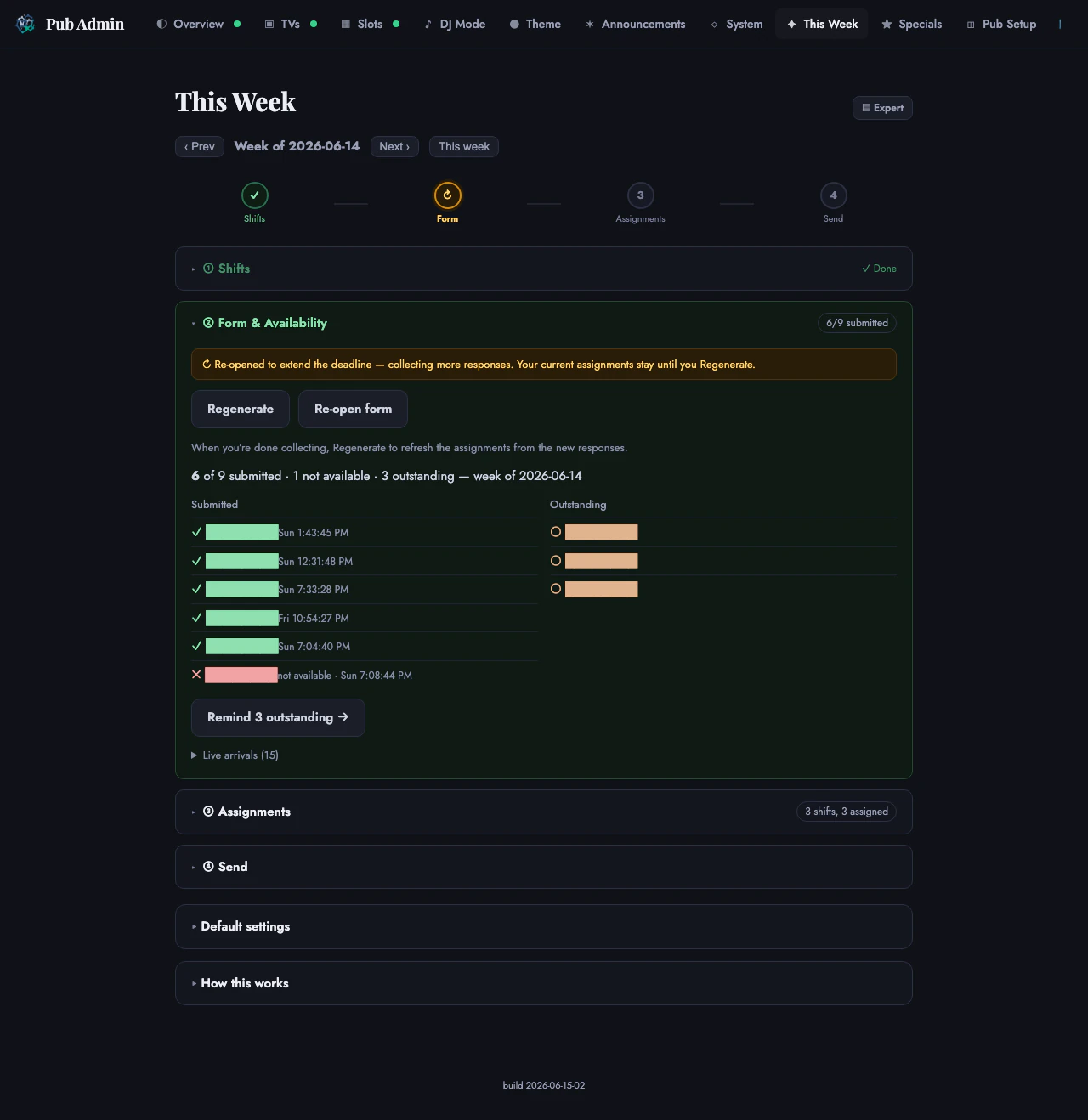 Scheduler form and availability step · names redacted
See pub-scheduler-n8n for the full weekly workflow.
Related
- ihnyc-avi-pub-landing — parent service
- pub-scheduler-n8n — weekly scheduling workflow detail
- ops — deployment and secrets