The Q-SYS Core is the pub’s audio and AV hub. The Raspberry Pi reads and controls
the other AV gear through the Core over QRC (Q-SYS Remote Control, JSON-RPC on
TCP 1710) instead of opening a separate session to each device. The Pi forwards
what it reads into its heartbeat, so the admin System Status panel shows live
device state.
Why through the Core: the AVPro matrix and the projector each expose a single control session. When the Q-SYS plugins and the Pi both opened those sessions directly, they fought for the one slot and the plugins flapped. Routing the Pi’s reads through QRC ended that contention.
Topology
flowchart LR
  subgraph Core["Q-SYS Core 110f"]
    QRC["QRC named controls"]
    MODE["Sound-stage ModeSelect"]
  end
  AVPRO["AVPro AC-MX-42<br/>HDMI matrix"] --- Core
  PROJ["Panasonic PT-FRZ55<br/>projector"] --- Core
  TSC["TSC-70-G3<br/>touchscreen"] --- Core
  PI["Raspberry Pi"] -->|"QRC read: matrix routing,<br/>projector, touchscreen, mode"| QRC
  PI -->|"QRC set: apply desired mode"| MODE
  PI -->|"heartbeat: device status"| WK["Worker / admin<br/>System Status"]
  WK -->|"desired mode (D1 poll)"| PI
  TSC -->|"lighting plugin: HTTP to dmx-api :5001"| DMXAPI["Pi dmx-api<br/>par-can rig"]
What the Pi reads over QRC
| Device | Read | Pi env |
|---|---|---|
| AVPro AC-MX-42 matrix | Active HDMI route + signal-detect per input | AVPRO_SOURCE=qsys |
| Panasonic PT-FRZ55 | Power, input, signal | PROJECTOR_SOURCE=qsys |
| TSC-70-G3 touchscreen | Current page, temp, brightness, network | TSC_ENABLED (default on) |
content_mode is signal-gated: an input that’s routed but has no live signal
(InputDetect=0) reports music, not video, so a dead HDMI source can’t force
a movie layout.
The admin System Status panel renders what the Pi reports over QRC — the Song-ID Pi, AVPro matrix, projector, and touchscreen — next to the external API health:
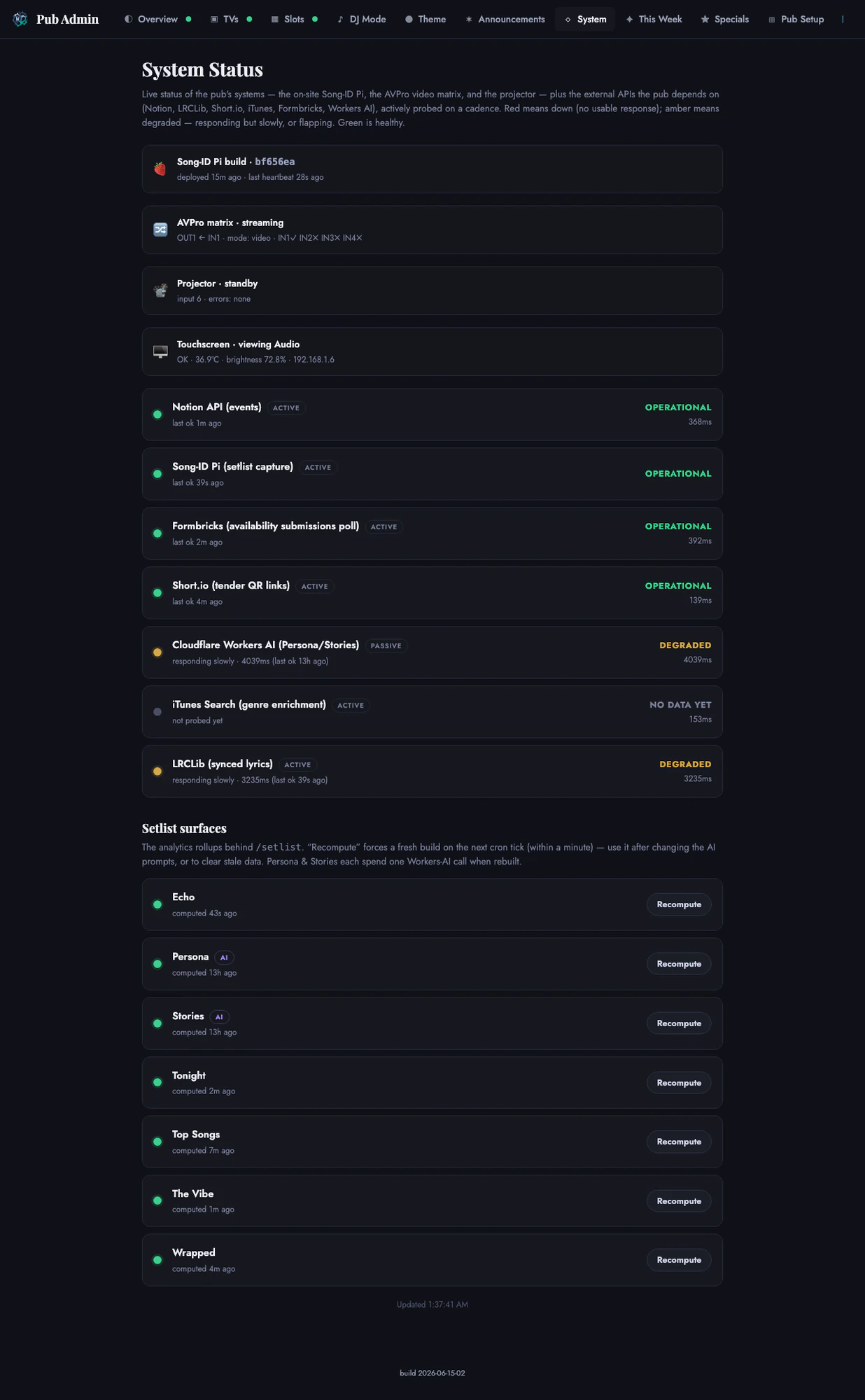 Admin system health view · June 2026
Sound-stage modes (Party / Default / Movie)
A single-row D1 table (pub_qsys_state) holds a desired mode (set by the admin
or the TSC) and the current mode (read from the Core). The Pi polls
GET /api/qsys/desired ~every 5s and applies the change via QRC; the Core’s
ModeSelect is the source of truth. Gated by QSYS_ENABLED until the
Designer-side ModeSelect control and snapshots exist.
| Field | Meaning |
|---|---|
desired_* | Pending request from admin / TSC |
current_* | Live mode the Pi read from the Core |
DMX lighting from the TSC-70
Lighting is the second surface driven from Q-SYS, and it ships. The
IHNYC Pub Lighting plugin (qsys/ihnyc-pub-lighting.qplug, v1.11+) gives the
TSC-70 touchscreen live, Hexcon-parity control of the DMX par-can rig. Unlike the
sound-stage modes, the plugin does not go through the Core’s QRC — it talks
HTTP straight to the Pi’s dmx-api on :5001 (the Pi is the DMX master). Each
button press fires an async, timed HTTP call; a /status poll drives the Online
dot, the live per-can swatches, and the mirrored fader positions, so a Pi outage
just makes the panel go dark instead of hanging.
What the panel exposes:
- Looks — every dmx-api program (rainbow / chase / fade / pulse / wave / comet / aurora / strobe / police / sparkle / theme / music) as a radio toggle.
- Music modes — music-reactive autopilot incl. an RGB reactive mode.
- Color — 8 preset macro washes + manual R/G/B mix faders (
POST /color, whole-rig solid color), plus a Fade-time fader. - My Looks — 6 save-a-look presets (
/preset/save|recall). - Moments — one-shot cue bursts (
/cueflash / last-call / birthday / closing) that take over then restore the prior look. - Blackout — a latching hold (
/config force_black), not a momentary flash.
Install = double-click the .qplug (it appears under the IHNYC category in
Schematic Elements — not via Asset Manager). The plugin is re-paginated for the
TSC-70-G3’s 7” touch floor into three pages (Operator / Looks / Mix). The full
behavior of the rig itself lives in
dmx-lighting.
TSC theme-sync — what does and doesn’t follow the theme
The bar TVs and the par-cans follow the active V2 theme accent live; the TSC-70
touchscreen does not fully. Whole-venue TSC reskinning was investigated and
closed as won’t-do (PR #725): the touchscreen’s base accent is hardcoded CSS,
not script-recolorable, so the static navy / light-blue look stays put by design.
A separate tsc-theme-sync.lua Control Script does sync what can be synced — it
polls the live theme_accent (exposed on the lighting Pi’s /status) and tints
the handful of named UCI controls that accept a runtime .Color. It is an accent
shift, not a reskin.
One-tap “Vibe” (audio + lights together)
A Vibe sets the whole room mood in a single press — it recalls a sound-stage
audio snapshot and drives the lights at once. This is the
qsys/soundstage-vibe.lua Control Script (not the lighting plugin), because
the plugin can only speak HTTP to the Pi and can’t recall a Core-side audio
snapshot; the script bridges both halves. It reaches the Snapshot Controller by
name (no schematic wiring) and POSTs the lighting straight to the Pi.
| Vibe | Audio snapshot | Lights |
|---|---|---|
| Party | Party voicing (load_2) | full intensity + music autopilot |
| Chill | Default voicing (load_1) | half intensity + warm scene |
| Movie | Movie voicing (load_3, optional) | dim + warm scene |
| Closing | Default voicing (load_1) | amber wash |
Related
- aes67-bridge — audio path off the Core
- dmx-lighting — the DMX par-can rig the lighting plugin drives
- pi-capture-ops — Pi runbook